Create a Furniture Moodboard
Collect pieces from any shop, compare them, and see them together, with real sizes behind the pictures.
A furniture moodboard is a collection of the pieces you are considering, laid out together so you can judge whether they suit each other. A useful one also keeps each piece's real size and price, so the board you love can be checked against your room before you buy any of it.
What a Moodboard Is For
A moodboard answers the question a shop page cannot: do these things look right together? Colors, materials, shapes and proportions only show up once the pieces are in one place.
Most of what a board shows is agreement between pieces, not one piece on its own:
- Three wood tones that each looked warm turn out to be two warm and one pink.
- Four metal finishes from four shops, and none of them match.
- Two whites side by side, and one of them is blue.
- A chair that looked substantial is half the visual weight of the sofa.
The Usual Problem
Most moodboards are pictures. They show a sofa you like and a rug you like, but not that the sofa is 240 cm (94 in) wide and the room is 300. You fall for the board and find out about the sizes later.
A Moodboard With Sizes Behind It
In Nooked you save pieces from any shop with the extension or by pasting a link. Each one arrives with its photo, price and size read from the page, and sits on the moodboard as part of the room.
You can add paint, wallpaper and rugs to the same board, try color palettes, and move pieces around until the mix looks right. Nothing on the board is only a picture, so every piece can go straight onto the floor plan.
See It Together, Then Compare
When two sofas are competing for the same spot, pick them and compare. Price, size and footprint sit side by side on fixed rows, and each piece is checked against your room. You can add something you already own as a reference.
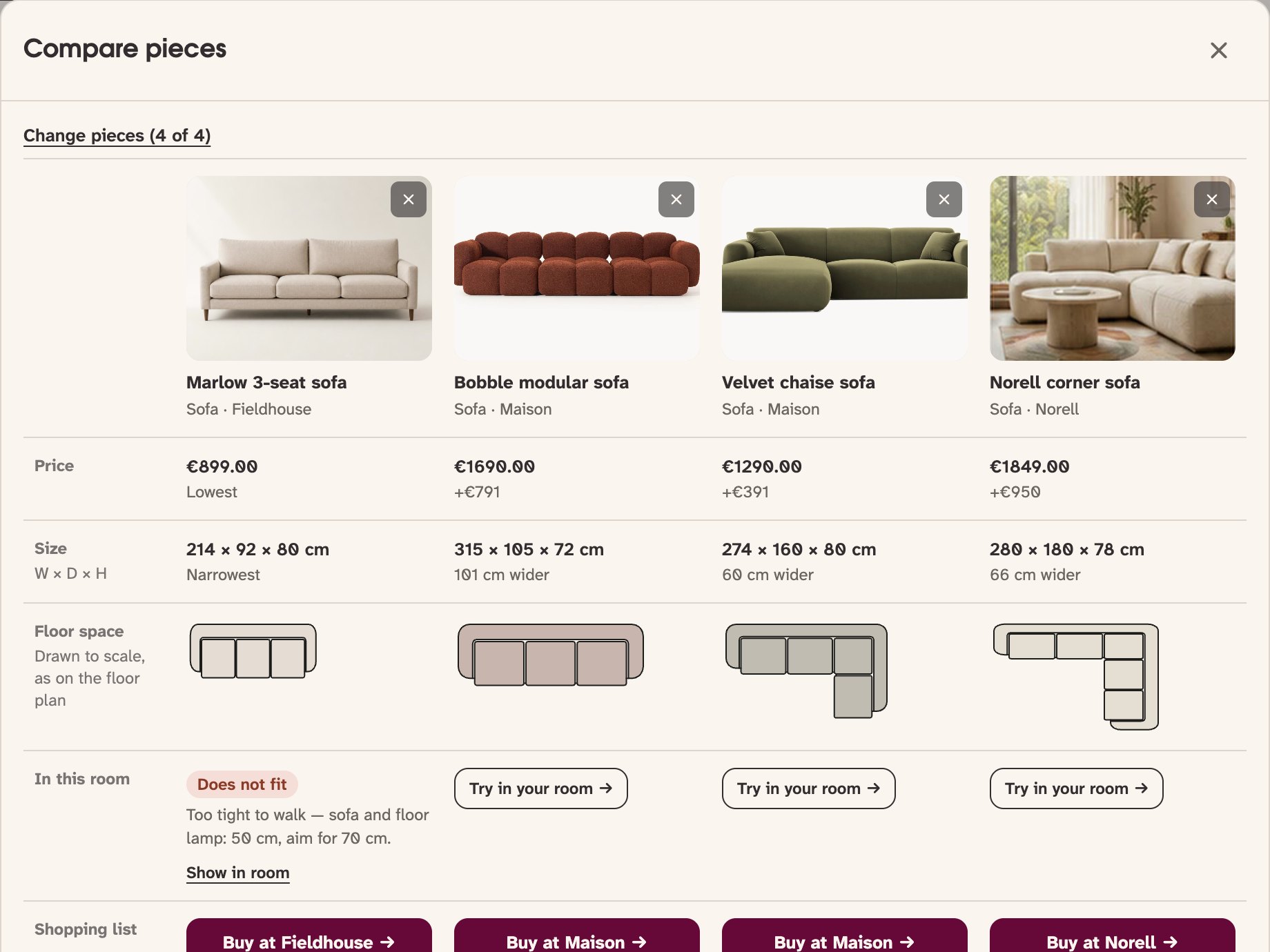
Narrow It Down
Collecting is the easy half. Three to five candidates for each spot is where a board starts deciding things. Past five you are putting the decision off, and every new tab moves it further away.
From Moodboard to Floor Plan
The last step is to put the board in the room. Place the pieces on the floor plan at real scale and check the gaps, walkways and doors. If something does not fit, swap it on the board and see the effect straight away.
Common questions
- How do I make a furniture moodboard?
- Collect the pieces you are considering from different shops, put them on one board, and look at how they work together in color, material and shape. In Nooked you save pieces with the extension or a product link, and each one keeps its size and price.
- Can I add furniture from any shop?
- Yes. Paste a product link or save it with the Chrome extension, and Nooked reads the photo, price and size from the page.
- Can I check whether my moodboard fits my room?
- Yes. Every piece on the board can be placed on your floor plan at real scale, where the clearances and walkways are checked.
- Can I try paint, wallpaper or rugs on the moodboard?
- Yes. You can add paint, wallpaper and rugs next to the furniture and try color palettes built from the pieces you have chosen.
- Do I need to measure my room before making a moodboard?
- No. The moodboard works without a room, and plenty of people start from something they liked rather than a tape measure. Add the room when you want to check the fit.
- Should furniture I already own go on the board?
- Yes. The sofa you are keeping is the biggest limit on everything you buy next, and a board without it shows a room you are not going to have.
Create your moodboard in Nooked
Nooked is a furniture fit checker and decision tool that lets shoppers place real furniture at real scale before buying. Compare finds from different stores and build a moodboard of pieces that fit together in size and style.