Nooked for Chrome
The furniture fit checker, right in the shop you are browsing. Save a piece with its photo, size and price, then see how it fits your room at real scale before you buy.
Add to Chrome
Nooked is a furniture fit checker and decision tool that lets shoppers place real furniture at real scale before buying. Compare finds from different stores and build a moodboard of pieces that fit together in size and style.
Nooked for Chrome is the free browser extension that brings pieces in while you shop. It is a real extension from the Chrome Web Store, and it works together with the Nooked web app at nooked.design.
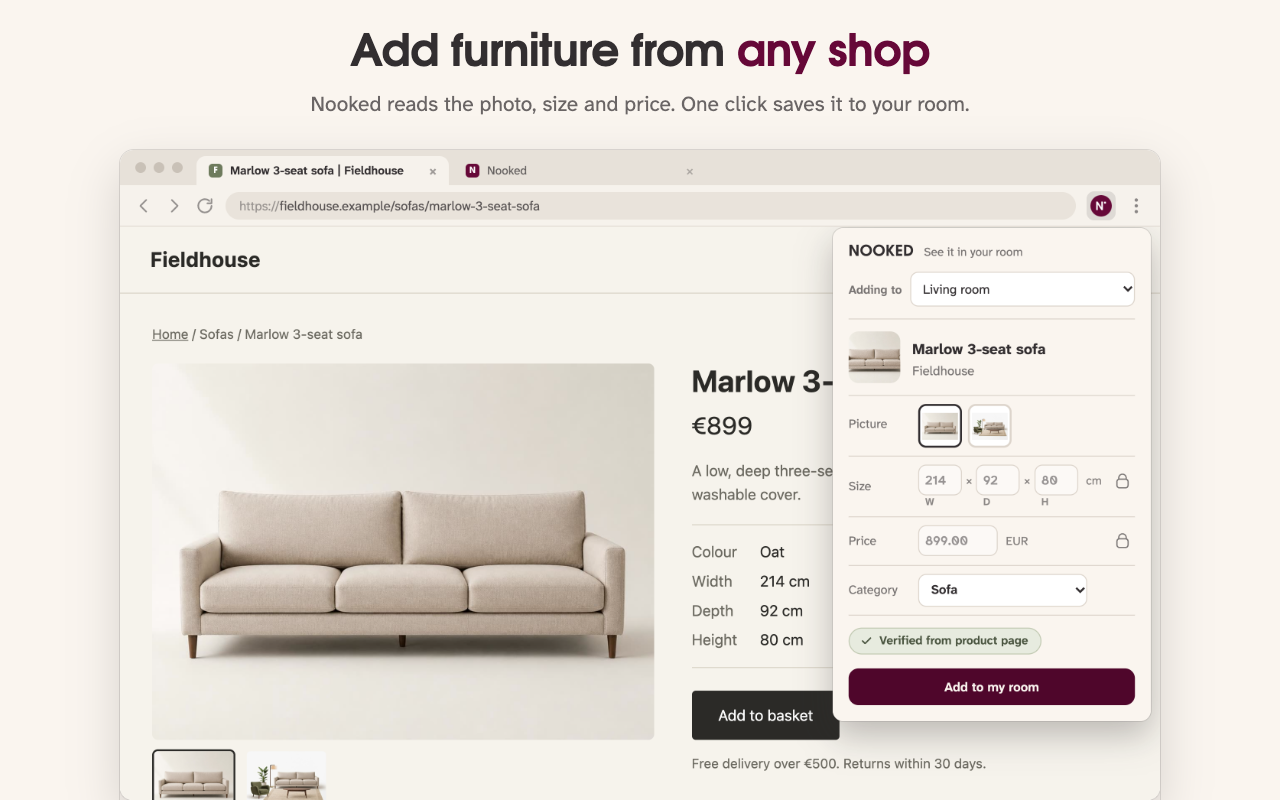 The extension reading a sofa's photo, size and price on a shop page.
How it works
- Browse any furniture shop. Shop wherever you normally do. When Nooked recognizes a product (furniture, lighting, rugs, decor, plants, paint or wallpaper), a small pin appears on the product image.
- Check the details. Click the pin and Nooked reads what the page already shows: the photo, size, price and category. Pick the room it is for and correct anything that needs changing.
- Click "Add to my room". Keep browsing. The piece waits in that room in Nooked, where you can place it at its real size, see the clearances around it and compare it with pieces from other shops.
Privacy
The extension makes no network requests of its own. Checking whether a page is a product page happens on your device and sends nothing. A product's details are passed to Nooked, in your own browser, only when you click "Add to my room" on that item.
Questions
Is Nooked a Chrome extension or a website?
Both. Nooked is a furniture fit checker that runs in the browser at nooked.design, and Nooked for Chrome is its free extension in the Chrome Web Store. The extension saves pieces from shop pages; the web app is where you check how they fit.
Is the extension free?
Yes, the extension is free to install. Nooked itself is free to try: the first 5 pieces you save from shop pages are free, and after that Nooked Plus is a one-time pass with no subscription.
Which shops does it work with?
Almost any online shop. Nooked is not limited to a list of partner stores; it reads the product information the page already shows in your browser. If a size is missing, you can type it in.
Why does Chrome say it can read data on all websites?
To spot product pages, the extension looks at the pages you visit. That check runs on your device and sends nothing anywhere. The extension makes no network requests of its own, and a product is passed to Nooked only when you click "Add to my room".
Does it work in other browsers or on a phone?
It is built for Google Chrome on a computer, and most browsers that install from the Chrome Web Store can use it too. Phones do not run extensions; on a phone you can add a piece to Nooked with a product link instead.
Do I need an account?
You can try Nooked without one. An account is only needed to save your room plan.